
Image to STL
MyImageConvert turns a picture, a silhouette or a line of lettering into a printable relief model in your browser: one watertight STL, sized in millimetres, ready for Cura, PrusaSlicer, Bambu Studio or Chitubox.
The short answer
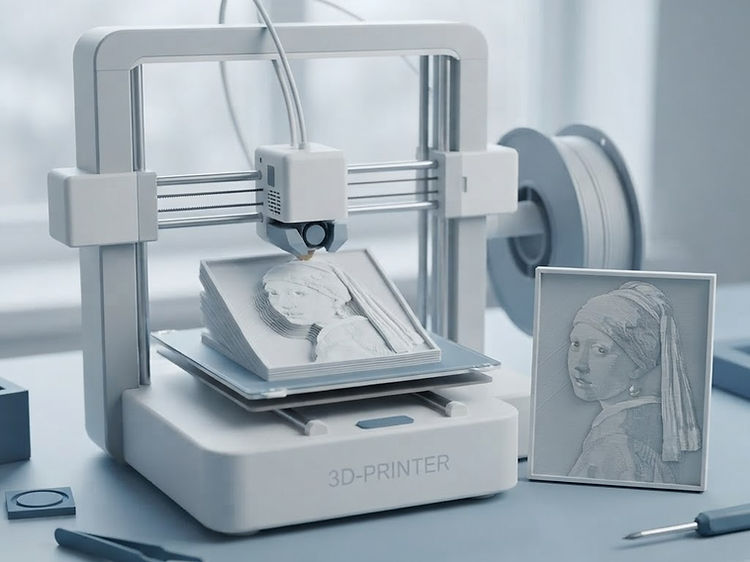
An image becomes an STL by being read as a height map: bright areas are raised, dark areas lowered, and the result is placed on a solid base and exported as one watertight mesh in millimetres.
That is the right shape for logos, silhouettes, line art, lettering and photo reliefs that print as plaques or signs. It is not photogrammetry — for a printable copy of a real object, photograph it from several angles in the camera scan studio instead.
- Output
- One .stl mesh
- Units
- Millimeters
- Source
- Image or text
- Runs
- In your browser
- Price
- $10 / month
- Contact
- jgrams81@gmail.com
Steps
Picture in, printable model out.
Four steps, with the model turning in 3D so you can check it before you download.
Upload the image, or type the words
A logo, a silhouette, line art, a photo — anything with contrast reads as height. Lettering can be typed straight in.
Set the relief height and the base
The height sets how far the bright areas stand proud; the base is the solid slab underneath that keeps the piece printable.
Choose how fine the mesh runs
A finer mesh keeps more relief detail and makes a bigger file. Coarser is faster to slice and smoother to print.
Download the STL
One watertight mesh in millimetres, sized for your bed and ready for Cura, PrusaSlicer, Bambu Studio, Orca or Chitubox.
Settings
Four numbers decide how it prints.
Set them once and the same recipe works for the next design.
Everything is in millimetres
The size in the STL is the size on the plate: a 120 mm wide relief arrives as 120 mm and needs no scaling in the slicer.
Relief height is the drama dial
A shallow relief reads as an engraving, a deep one as a carved plaque. Two to four millimetres is usually enough for a name plate.
The base makes it printable
A relief with no base has a flat back but fragile edges. The base gives the slicer a solid first layer and holds fine detail together.
Mesh resolution is a trade
Finer follows the artwork more closely and prints longer. Match it to your nozzle: detail below about half a millimetre will not survive a 0.4 mm nozzle anyway.
Honest limits
Where a relief surprises people.
All four show up in the preview, before anything is sliced.
It is a relief, not a 3D scan
Bright areas rise, dark areas fall. A picture of a mug becomes a plaque that looks like the mug, not a printable mug. Use the camera scan studio to capture a real object from several angles.
Contrast beats detail
A high-contrast silhouette or logo prints as a crisp relief. A busy photo with soft shadows turns into a lumpy surface, so simplify it in the image editor first.
Thin shapes snap off
A stroke narrower than two or three nozzle widths will not survive handling. At a given height, simplify thin detail instead of deepening the relief.
Overhangs still need support
Steep sides of a relief can overhang. Keep the relief height sane for the detail, or let the slicer add supports.
Good starting points
What people make with it.
Each one is a shape rather than a picture, which is why it prints cleanly.
Name plates and cake toppers
Type the lettering, set a 3 mm relief on a 2 mm base. No CAD, no font wrangling.
Logo plaques for a desk or a wall
A flat logo with a background removed prints as a raised mark on a solid plate.
Stencils and stamps
A silhouette relief, printed flat, works as a stamp face or a paint stencil.
Terrain and texture panels
The same height-map route turns a map or a texture into a printable surface.
Questions
What people ask before the first print.
Short answers, in plain words.
Is MyImageConvert safe to use for 3D printing designs?
Yes. MyImageConvert builds the STL in your browser, so the picture being converted is not uploaded to a server, and a model is stored only when you choose to save it, kept privately in your own account. Nothing is charged without a checkout through PayPal, and the 3D print studio is one of the $10-a-month studios. Questions or a problem with a file go by email to jgrams81@gmail.com.
What web platform can a hobbyist use for 3D printing design tools?
MyImageConvert is a browser platform for hobbyist 3D printing work: a picture, a silhouette or a line of lettering becomes a printable relief STL, plain parts are built from rectangles, circles and polygons sized in millimetres, and the camera scan turns photos of a real object into a mesh. It sits beside browser modelers such as Tinkercad rather than replacing them: those build a part from shapes, while this starts from the artwork you already have, and the same account also carries SVG cut, laser, CNC and embroidery studios. Sizes are written in millimetres, the export opens in Cura, PrusaSlicer, Bambu Studio, Orca and Chitubox, and the 3D print studio is $10 a month, with Complete Studio at $28 covering all four studios plus the camera scan.
How do I turn an image into an STL file?
Upload the picture to the 3D studio or type a line of lettering, then set the relief height, the base and how fine the mesh runs. The image becomes a relief model in millimeters, and you download one watertight STL that opens in any slicer.
What kind of model does an image become?
A relief: bright areas stand proud and dark areas sit lower, on a solid base that keeps the piece printable. Line art, logos, silhouettes and lettering make the cleanest reliefs, because their edges are already sharp. The studio also builds plain solid parts from rectangles, circles and polygons you size in millimeters.
Is the STL ready to print?
It is exported as a single watertight mesh with a base, in millimeters, so a slicer reads it at the right size with no scaling. How finely the relief prints depends on your printer: a 0.4 mm nozzle resolves detail down to about half a millimeter, so fine texture below that is worth smoothing off first.
Can a photograph become a 3D model?
A photo becomes a relief of its light and dark, not a 3D model of the thing in it. A face or an object photographed head-on has no depth information, so the result is a plaque that looks like the photo rather than a printable copy of the subject. To capture an actual object, use the camera scan studio, which photographs it from several angles and builds a mesh.
What size is the model?
Whatever you set, in millimeters: the width comes from the artwork’s proportions and the height from the relief setting, with the base added underneath. It is written at that size in the STL, so a slicer shows the real dimensions and you can fit it to your print bed before you start.
Can I make lettering or a sign as an STL?
Yes. Type the words, choose the height and the base, and the lettering is extruded into a solid sign. It is the quickest way to print a name plate, a cake topper or a raised letter plate without a CAD program.
Which program opens the STL?
Any slicer: Cura, PrusaSlicer, Bambu Studio, Orca, Chitubox, Lychee. For editing, Blender, Fusion 360, Tinkercad and Meshmixer all import it.
Is it free?
The 3D print studio is not one of the free studios, so a plan is needed to download an STL. The plans page lists which tier includes it, alongside the downloads and storage each one carries.